The right tools won’t magically make you a better writer, but they can make the process easier. From plotting to polishing, we’ve rounded up 9 standout apps and platforms that’ll help you create your best work yet in 2026.
Whether you’re tackling your first draft or (finally!) prepping your manuscript for publication, there’s a tool below that’ll help you on your journey!
Our top picks
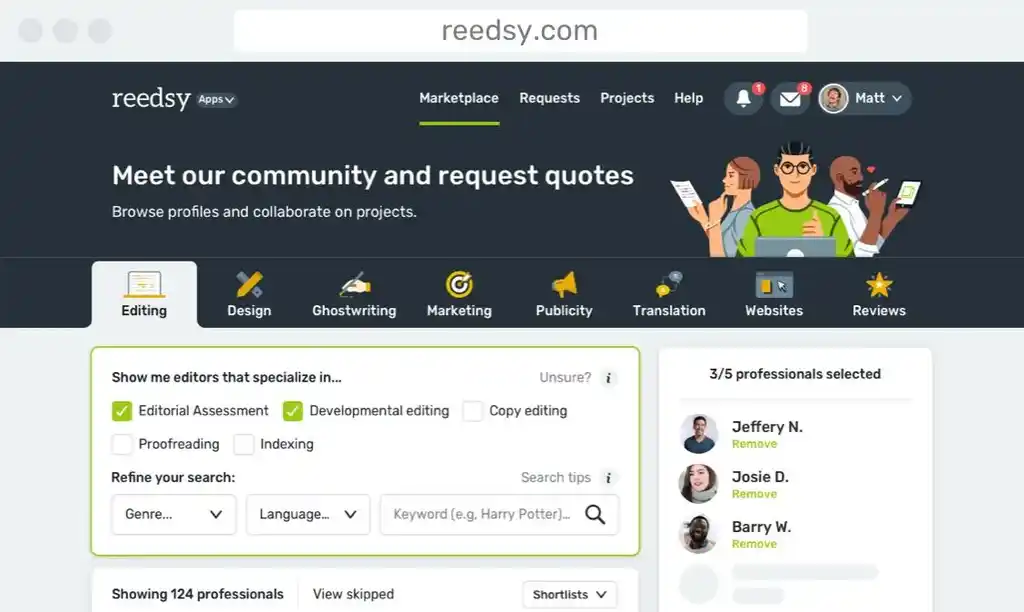
No time to get into the nitty-gritty? Here are the three top writing tools to try out in 2026, starting with Reedsy Studio. It's basically the Swiss Army knife of writing software — an unbeatable piece of kit that will let you plan, draft, edit, and format your book for publication, all in one place. If you're tired of juggling seventeen different apps just to finish a manuscript, this is your answer.
Coming in at number two is Plottr, which has become the visual story planner for anyone who thinks better in pictures than paragraphs. (And honestly, who doesn't love a good color-coded timeline?)
Finally, Cold Turkey Writer rounds out our top three. It’s the best distraction-free writing app out there, stripping away everything — and I mean everything — so you can focus on the only thing that matters: getting words on the page. No notifications. No bells and whistles. Just you and your writing.
| 🛠️ Tool | 💰Price | 🎯 Best for | ✨ Our favorite features |
| Reedsy Studio | Free or from $4.99/month for premium features | All-in-one writing and formatting | Built-in outlining tools + automatic professional formatting |
| Plottr | $60/year for standard plan or from $99/year for premium features | Visual plotting | Drag-and-drop timelines |
| Cold Turkey Writer | Free or lifetime access for $14.99 | Distraction-free writing | Stripped-down interface with zero distractions |
All-in-one writing tools
Reedsy Studio
-
💰 Price: Free for Basic plan; $4.99/month for Craft; $7.99/month for Outlining; $10.99/month for Craft + Outlining. Save 10% with an annual subscription
-
🎯 Best for: Writers who want one clean workspace from first sentence to publication-ready manuscript
-
📊 Trustpilot rating: 4.8
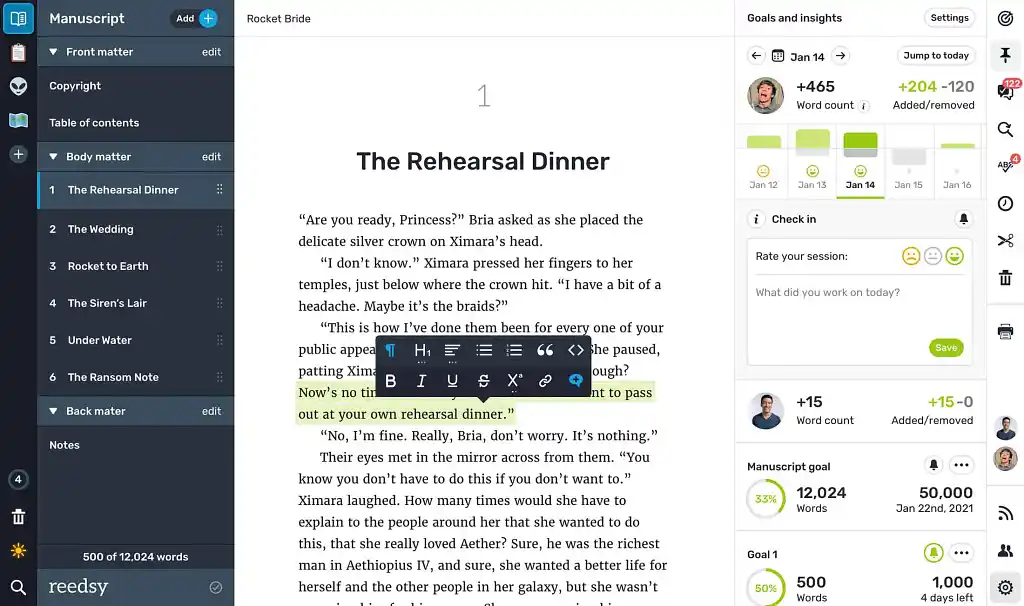 Reedsy Studio is what happens when a writing app stops trying to impress you with gimmicks and just works. The interface is focused, easy to use, and genuinely pleasant to write in — but it doesn't stop there. As you draft, your manuscript automatically formats to professional publishing standards, and you can export it with one click for free — no fiddling required. Plus, you can collaborate with co-writers and professional editors in real time and generate links to share chapters with early readers.
If you want more tools, Studio becomes a full planning-and-revision companion with its Craft and Outlining add-ons. You can map your story on Boards, track custom goals, and keep momentum without tab-hopping between seventeen different apps. It even offers a curated gallery of useful templates (for example, a handy Hero’s Journey structure template) you can download anytime. 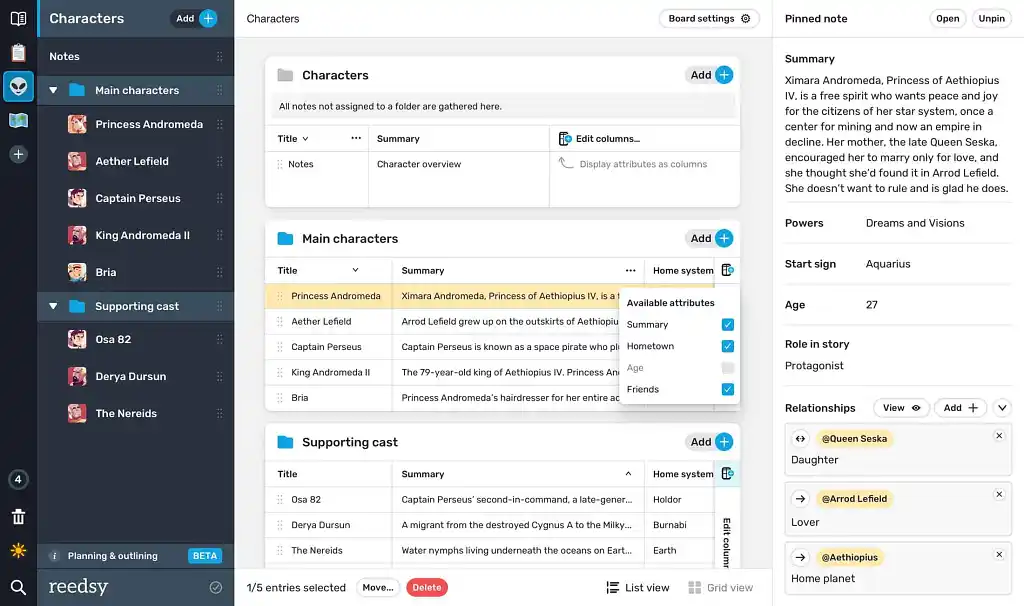 As a fully web-based platform, Studio prioritizes accessibility and automatic updates, though this means you'll need an internet connection to write. If you're planning a writing retreat in a cabin with spotty Wi-Fi, you'll need a backup plan. The formatting options are also streamlined around the most popular publishing standards — you'll find commonly used trim sizes like Trade and Digest, but if you're planning a print edition in an unusual format, you may need to look elsewhere.
Overall, Studio is tough to beat. It has a 4.8 rating on Trustpilot, with reviewers frequently praising how intuitive it feels, how easy it is to stay organized and on track, and how painless the export process is. Responsive support and a thoughtfully designed workflow round out what many users have described as a genuinely writer-first platform.
If you want to test drive the premium features, sign up for a 30-day free trial, then upgrade to Craft + Outlining for just $10.99/month (or keep things simple and sign up for the Basic plan for free!).
|
Pros |
Cons |
|
➕ Very user-friendly interface
|
❌ No offline mode — requires an internet connection |
|
➕ Free plan is genuinely usable for full manuscripts |
❌ Limited file types available for exporting (PDF, epub) |
|
➕ Cloud-based access from any device means no installs required |
|
|
➕ Professional-grade formatting baked in from the first draft |
|
|
➕ Excellent collaboration tools (comments, tracked changes) |
Atticus
- 💰 Price: One-time purchase of $147
- 🎯 Best for: Writers who want a dedicated formatting tool and granular customization options
- 📊 Trustpilot rating: 4.3
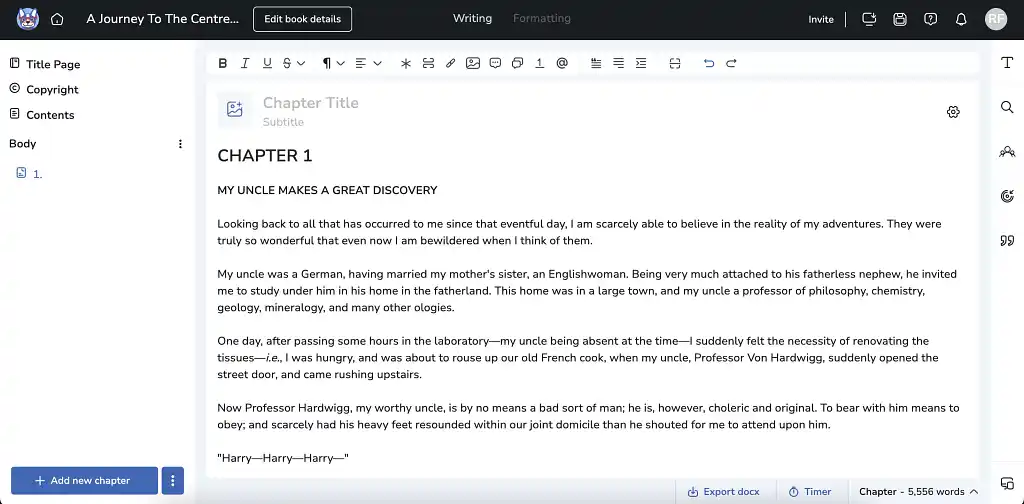
Atticus positions itself as a one-stop solution for indie authors, combining both a book editor and a formatting tool in a single browser-based platform. Draft, format, export for print or e-book — all from the same tool. No juggling multiple apps, no separate formatter needed.
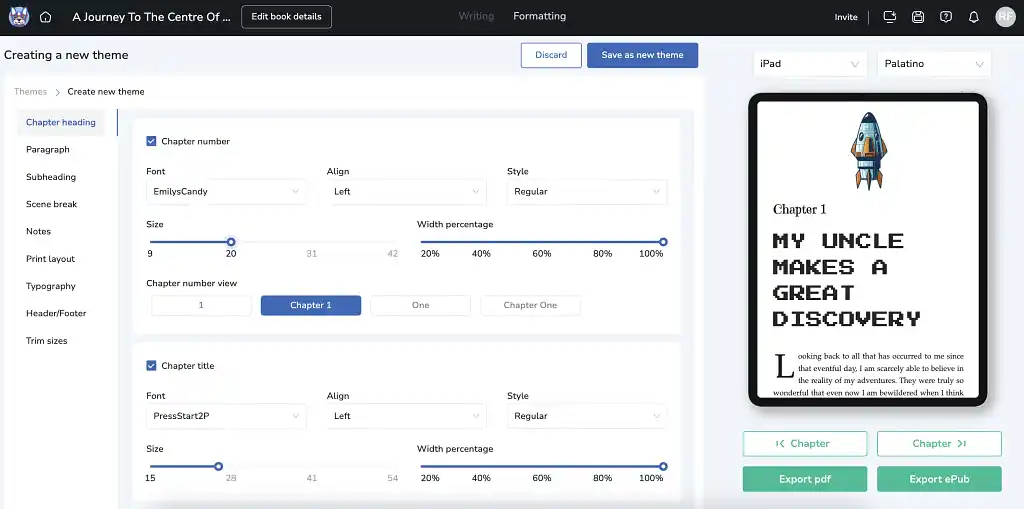
What Atticus is most known for among countless writers is its formatting options. You get serious control over your book's final look: 17 templates plus a granular theme builder where you can tweak fonts, sizes, and alignment for pretty much every element. The real-time previewer lets you see exactly how your book will look across different e-readers, and the text decoration options — callout boxes, 36 decorative page breaks, text message formatting — are genuinely impressive. Plus, trim sizes are optimized for KDP and IngramSpark, and the support team is responsive with plenty of tutorials.
That formatting-first focus shows up in the writing experience, too. The editor is clean but deliberately minimalist — you won't find plotting tools, research features, or a built-in grammar checker. If your manuscript uses headings to mark chapters in Google Docs, Atticus won't recognize them on import, leaving you to split everything manually. Also, the collaboration feature only works if your co-authors have also bought Atticus (at $147 a pop), and you might hit occasional sync hiccups with its offline caching.
But for indie authors publishing multiple books who genuinely enjoy the formatting process, Atticus delivers professional results at a fair one-time price. Just keep in mind that most writers will still want a separate app for the actual drafting and editing phases — Atticus excels at making your finished manuscript look polished, not at helping you write it.
|
Pros |
Cons |
|
➕ Strong formatting controls for e-books and print |
❌ Basic drafting environment |
|
➕ Real-time previews across devices |
❌ File imports lose chapter structure (requires manual fixes) |
|
➕ One-time purchase with lifetime updates (no subscription required) |
❌ Performance issues reported by some users (slowdowns, syncing errors) |
Dabble
-
💰 Price: $9/month for Basic plan; $19/month for Standard; $29/month for Premium. $699 for lifetime access
-
🎯 Best for: Writers who want an all-in-one tool with flexibility across devices
-
📊 Trustpilot rating: 3.5
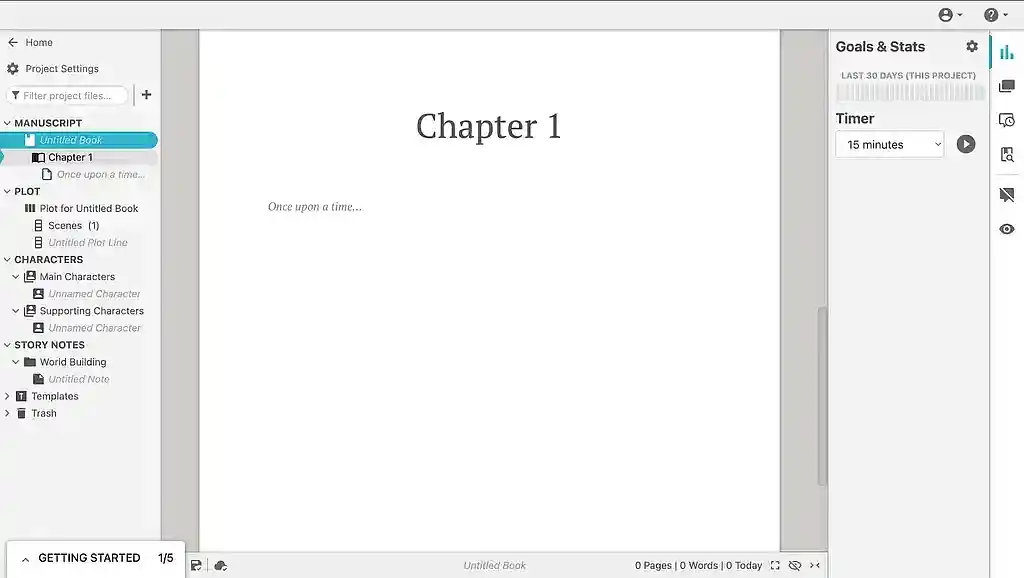
Available on macOS, Windows, Linux, and via web and mobile apps, Dabble is a solid option for writers. It's a straightforward tool that prioritizes ease of use over fancy customization, and honestly? Sometimes that's exactly what you need.
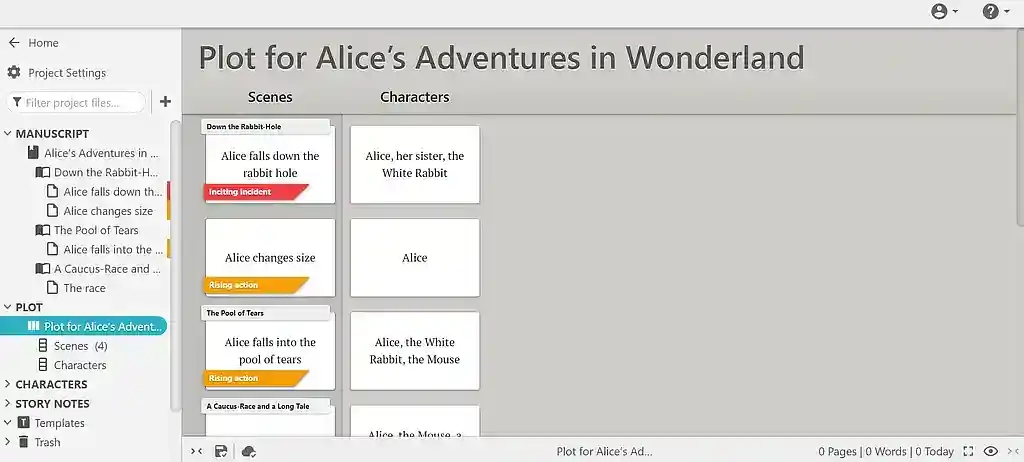
The interface is clean and distraction-free, with a productivity sidebar that keeps your story notes and goals visible without cluttering up the actual writing space. The tool has been built around some very smart design choices. But we think Dabble's real standout feature is its grid-based plotting view, which makes mapping timelines, POVs, and story threads feel less like rocket science and more like... well, planning a story.
The cloud-first syncing actually works as promised. Write on your desktop in the morning, continue on your phone during lunch, switch to your laptop at night — everything stays in sync. And if you're offline? No problem. Dabble lets you write without an internet connection and syncs everything back up once you reconnect.
As a writing-focused tool, Dabble keeps things intentionally streamlined on the formatting side. There are no formatting templates, front/back matter support, or direct PDF/EPUB exports — you'll export as .docx and move to a dedicated formatter like Atticus or Reedsy Studio to prepare for publication. For writers who prefer to keep drafting and typesetting separate, this focused approach makes sense. If you're looking for a tool that handles everything from outline to print-ready file, though, you might find yourself juggling multiple apps.
At $29/month for Premium (or $699 for lifetime access), Dabble sits at the higher end compared to many of the other tools we've listed here. That said, the lower monthly entry point might work better if you're not ready for a big upfront investment.
|
Pros |
Cons |
|
➕ Distraction-free interface with simple drag-and-drop organization |
❌ Expensive at $29/month for Premium or $699 for lifetime access |
|
➕ Reliable cloud syncing across desktop and mobile apps; offline mode available |
❌ Limited formatting/export features: no templates, no front/back matter, no PDF or EPUB exports |
|
➕ Strong visual plotting tools (Plot Grid) for mapping timelines, POVs, and story arcs |
❌ Plotting tools lack pre-set templates for specific story structures or character types |
|
➕ Built-in goal tracking to support consistent writing habits |
❌ Sparse, dated UI design |
Of course, some writers prefer to keep their plotting and drafting separate. If you're the type who needs every beat, arc, and thread mapped out before you start writing, let's look at tools built specifically for that…
Tools for plotting and outlining
Scrivener
-
💰 Price: $59.99 for macOS and Windows; $23.99 for iOS
-
🎯 Best for: Writers who want deep organization and control over complex projects
-
📊 Trustpilot rating: 4.3
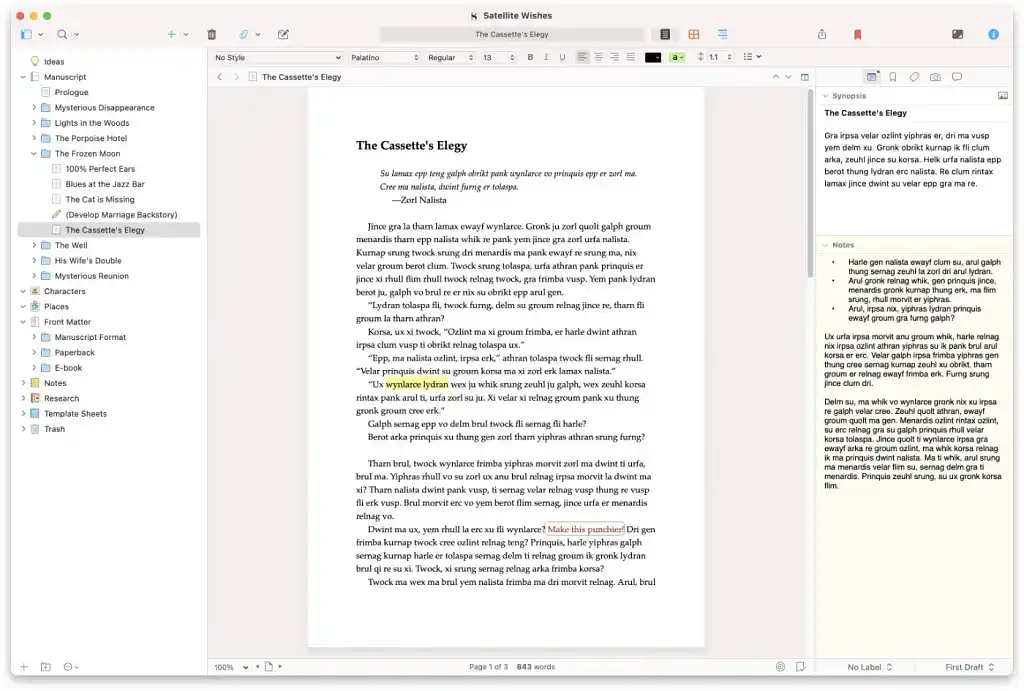 If you're the kind of author who needs your outlines, notes, research, and manuscript all living in the same place, Scrivener's your tool. Its signature Binder keeps everything accessible in one organized sidebar with folders, color coding, and custom labels, while the Corkboard view lets you visualize your project as movable notecards you can rearrange until your plot flows smoothly. The bookmark system is particularly clever too: you can bookmark frequently-used documents (like character sheets or worldbuilding notes) and open them side-by-side with your current work — no switching back and forth between tabs.
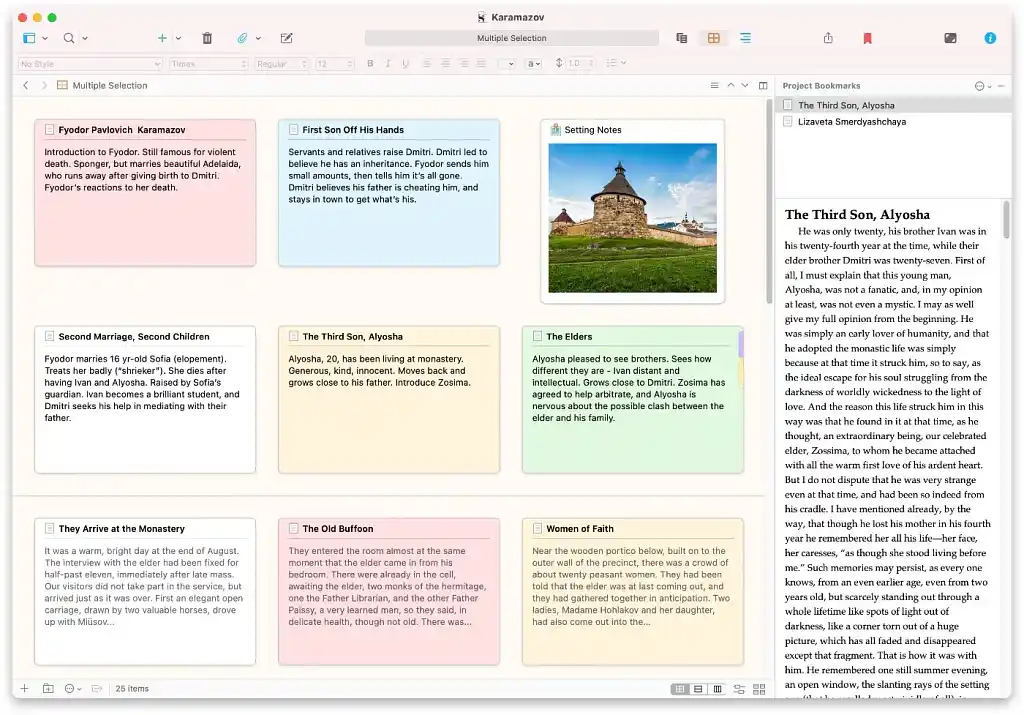
Scrivener also offers free templates that save your customization settings as presets, so you don't have to reconfigure everything when starting a new project. Plus, there's a 30-day free trial to test it out.
With all these options and customizations, there's naturally a lot to uncover and get used to — and with Scrivener, the learning curve is real. The software is complex to set up and can feel overwhelming at first, especially if you're coming from a simpler word processor. It rewards writers who enjoy deep structure and control, but expect to spend some time with tutorials before everything clicks into place.
So, who should use it? If you're working on lengthy, in-depth projects with lots of research, enjoy learning new software, and get genuinely excited about folder hierarchies and custom metadata fields, you'll probably love Scrivener. But if you want something that gets you from outline to formatted manuscript with minimal fiddling, or if you're not particularly tech-savvy, check out simpler options first.
|
Pros |
Cons |
|
➕ Powerful organizational tools (Binder, Corkboard, bookmarks) |
❌ Steep learning curve — expect to watch tutorials |
|
➕ Excellent for managing complex, research-heavy projects |
❌ Most users only use a small handful of the features |
|
➕Highly customizable workspace |
❌ Not ideal for easy collaboration, especially across platforms |
Obsidian
-
💰 Price: Free basic plan; $4/month for Sync and $8/month for Publish if billed annually; $5/month for Sync and $10/month for Publish if billed monthly
-
🎯 Best for: Writers who want a highly customizable knowledge base for outlining and idea linking
-
📊 Trustpilot rating: 4.3
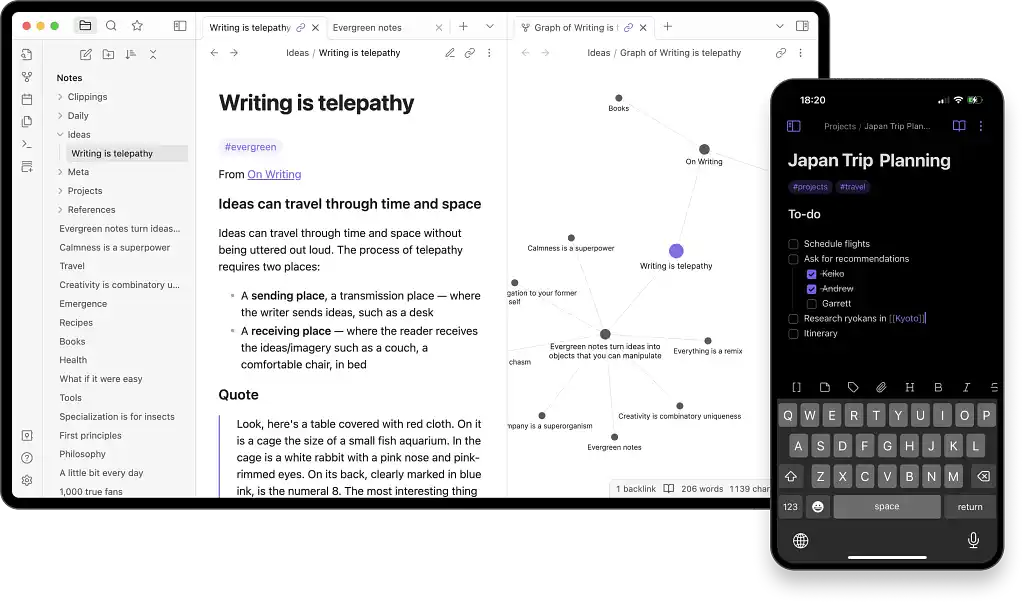 Obsidian isn't a traditional outlining app — it's more like a personal Wikipedia for your brain. Here's how it works: you create a "vault" of text files that you link together however you want. Character backstories connect to plot points. Worldbuilding notes link to relevant scenes. Research articles tie into themes. The result is a flexible web of interconnected ideas that mirrors how your brain actually thinks about stories.
The real magic is in the graph view: you see how your themes and ideas connect before you start writing, which is either incredibly helpful or mildly overwhelming, depending on how organized your brain is. (Probably both.)
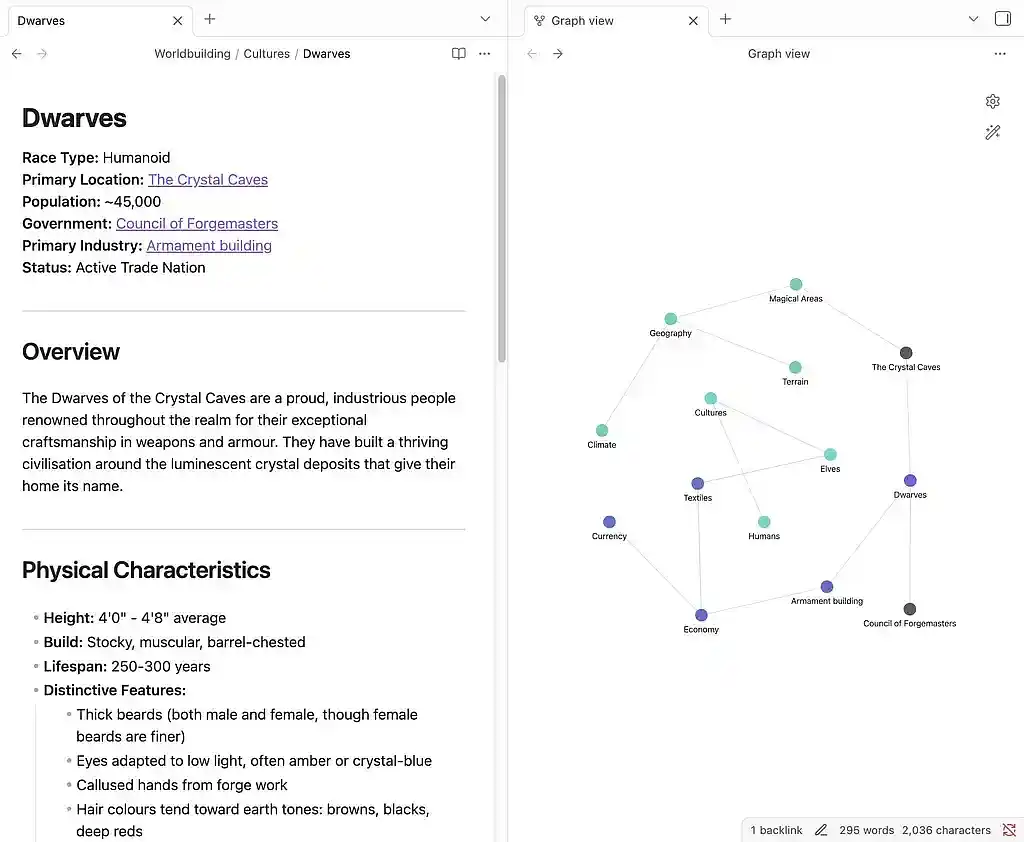
On sites like Trustpilot, reviewers consistently praise Obsidian's customizability, the fact that everything lives in local Markdown files (privacy win), and the extensive plugin ecosystem that lets you craft a workspace tailored to exactly how you think. That flexibility comes with a setup investment, though. Unlike dedicated story planners that work out of the box, Obsidian asks you to build your own system. Syncing across devices requires a paid add-on, and you'll want at least a passing familiarity with Markdown formatting to unlock its full potential.
We think this would be ideal for writers who get excited about learning new tools and want an outlining system that adapts to their brain instead of forcing them into someone else's template. If that sounds like you, Obsidian's worth exploring.
|
Pros |
Cons |
|
➕ Free base version with powerful core features |
❌ Automatic syncing across devices requires paid add-on |
|
➕ Stunning graph view visualizes connections between ideas |
❌ Steep learning curve; not very beginner-friendly |
|
➕ Excellent for research, linking, and worldbuilding |
❌ Requires third-party tools to draft and format final text |
|
➕ Highly customizable via extensive plug-in ecosystem |
Plottr
-
💰 Price: $60/year or $199 lifetime access for basic Plottr; $150/year for Plottr Pro; $270/year for Plottr Pro + Community
-
🎯 Best for: Writers who want a visual, drag-and-drop story planner before they draft
-
📊 Trustpilot rating: 4.6
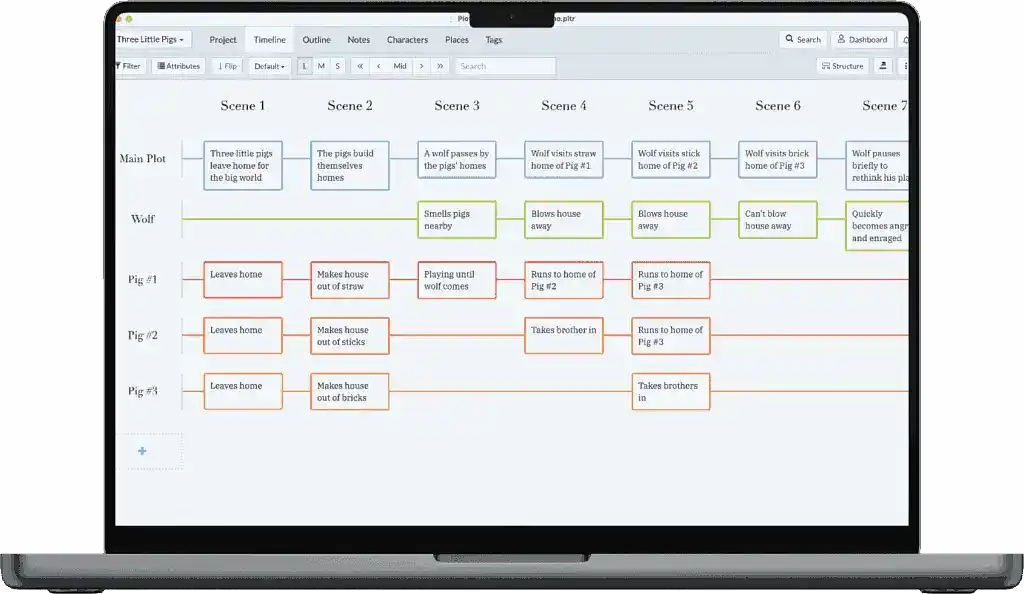
Plottr is a visual outlining tool designed to help you shape your story before you start writing. Think of it as a digital corkboard meets story bible. You get color-coded timelines, draggable scene cards, and plotlines you can rearrange on the fly. Planning a series? Tracking multiple character arcs? Need to make sure your subplot about the missing heirloom actually pays off in Act Three? Plottr's got you covered.
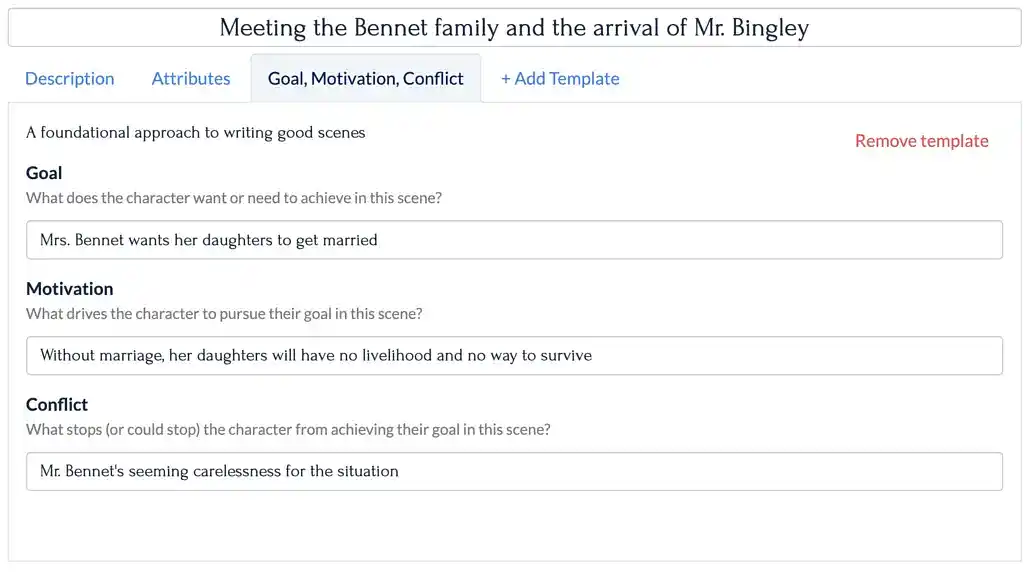
The interface is built for visual thinkers — writers who need to see their story laid out to understand how it works. You can toggle between its timeline view and outline view, and the two sync automatically. When you inevitably realize that the events of Chapter 7 should actually happen before Chapter 5? Just drag and drop. No rewriting your outline from scratch.
Reviewers online consistently comment on Plottr's intuitive interface and how it helps spot plot holes and pacing issues before drafting begins. (It’s always easier to fix problems in the planning stage than on page 200 of your manuscript.) But keep in mind that Plottr doesn't replace a full writing environment — there's no writing area, so you'll need a separate app to draft and format your manuscript. If your priority is getting a clear roadmap before you start writing, however, Plottr delivers exactly the focused, creative space you need to build that foundation.
|
Pros |
Cons |
|
➕ Easy to use with intuitive, visual interface |
❌ No writing area — requires separate word processor for drafting |
|
➕ Timeline and outline views that sync automatically |
❌ Real-time collaboration only available on premium Pro plan |
|
➕ Customizable with tags, Places, and Character tabs for worldbuilding |
Now, plotting software is great, but it's pretty pointless if you can't even make it through a single writing session without checking your phone a hundred times. For writers who need help staying on track, these next tools can be a real game-changer.
Tools to stay focused
Cold Turkey Writer
-
💰 Price: Free (basic); $14.99 for lifetime access for Writer Pro
-
🎯 Best for: Writers who need strict, no-escape focus to get words down
-
📊 Trustpilot rating: 3.7
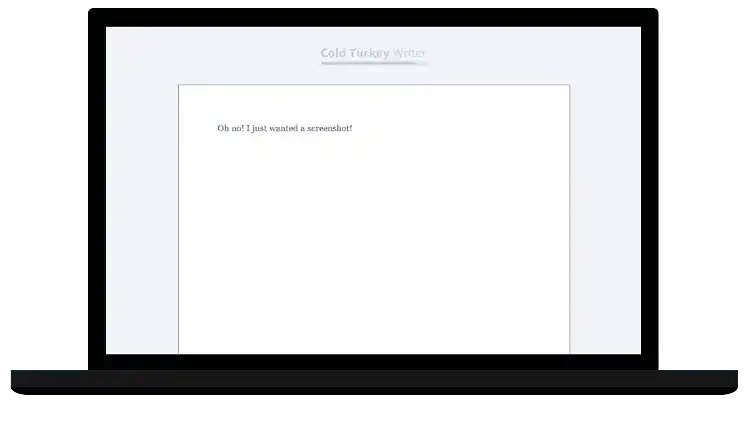
Cold Turkey Writer is exactly what it sounds like: digital cold turkey. Once you start a session, your computer becomes like a typewriter. No browsing. No multitasking. No "I'll just check my email real quick." You're locked in until you hit your word count or timer goal, and there's no escape hatch. It's brutal and effective, especially if you're used to tab-hopping your way through a writing session.
The philosophy here is simple: momentum matters more than polish, and distractions are the enemy. Can't edit what you haven't written, right? The Pro version adds helpful productivity hacks like disabling the backspace key to stop you from editing as you go, background soundtracks to help you focus, dark mode, and toggleable copy/paste. Cold Turkey Writer also pairs with Cold Turkey Blocker, a companion tool that blocks distracting websites and apps at the system level.
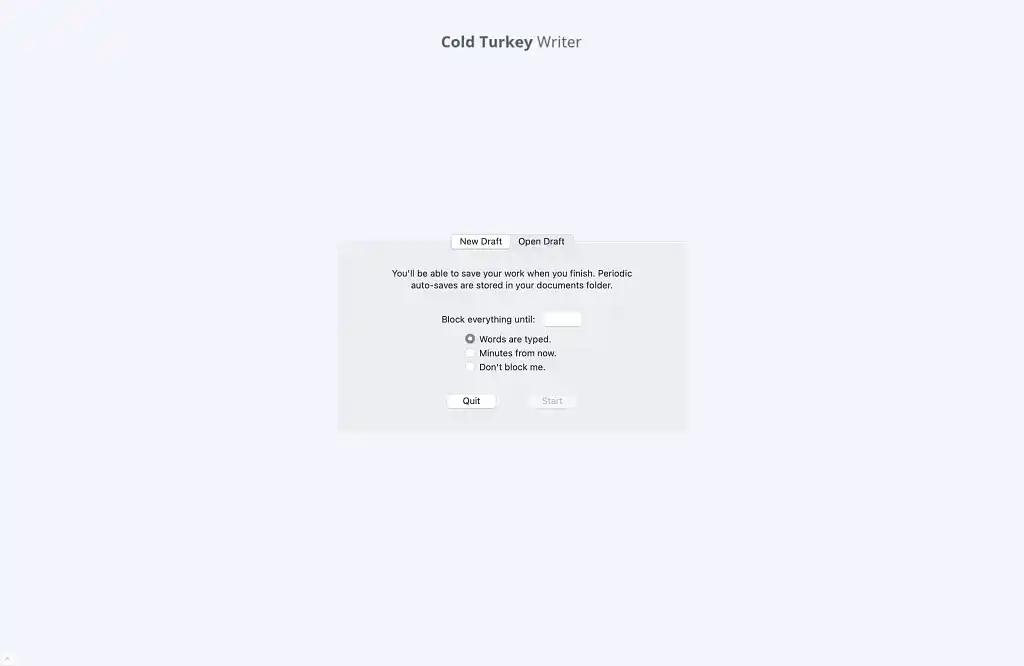
That no-escape approach is exactly what makes it effective — and exactly what makes it polarizing. Users on sites like Trustpilot consistently point to Cold Turkey's reliability and how well it forces focus during first-draft sprints. The flip side? That same rigidity means zero flexibility once a session starts. If you suddenly remember you need to check a research source or look up a character detail mid-session, you're out of luck until you hit your goal. It's a powerful solution for writers who thrive under extreme digital discipline and know exactly what they need to accomplish before they lock themselves in.
|
Pros |
Cons |
|
➕ Locks you into distraction-free writing until you hit your goal |
❌ Zero flexibility once a block is active |
|
➕ Highly effective for first-draft sprints and word count goals |
❌ Desktop only (Windows/macOS) — no mobile support |
|
➕ Data stored locally for privacy |
❌ Not suited for research-heavy or collaborative writing |
Google Docs
-
💰 Price: Free with a Google account
-
🎯 Best for: Writers who want a simple, accessible tool for distraction-free drafting and collaboration
-
📊 Trustpilot rating: 3.3
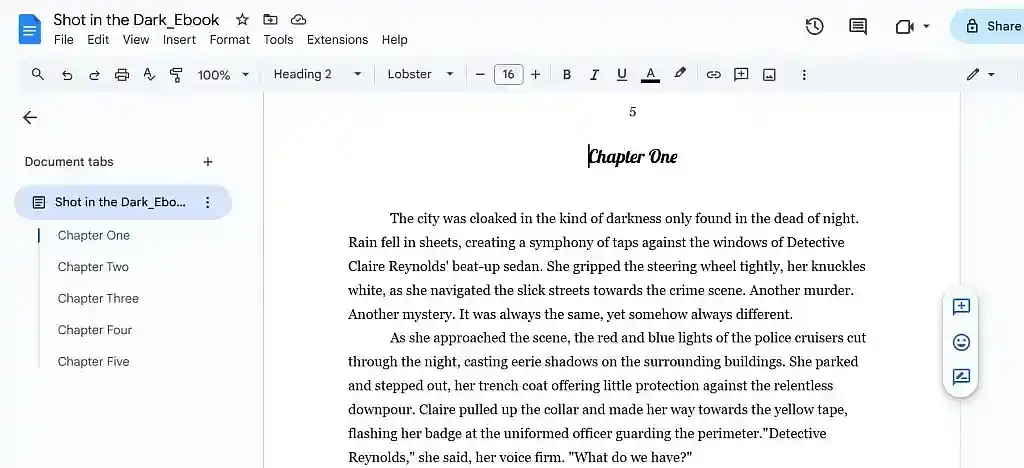
Google Docs is the default writing space for tons of writers — and for good reason. It's free, browser-based, and auto-saves your work in real time, which means you'll never lose a paragraph to a crash or power outage again. (If you've ever lost three hours of writing to a computer freeze, you know exactly how valuable this is.) The interface is clean, the learning curve is basically nonexistent, and because everything lives in the cloud, you can start a scene on your laptop and finish it on your phone during your commute home.
We also love that you can share your writing with editors, beta readers, or critique partners without creating a million different file versions named "Final_Draft_v3_ACTUAL_FINAL.docx". They can leave comments, suggest edits, and track changes — all in real time. For writers who need feedback throughout the drafting process, this feature is invaluable.
As a general-purpose word processor, Google Docs is optimized for drafting and collaboration rather than professional book formatting. If you're planning to self-publish, though, you'll want to export your manuscript and use a dedicated formatter to prepare it for publication. While third-party plugins like Page Sizer can help with custom trim sizes in Docs, the platform can get buggy when positioning images or handling complex layouts, and performance tends to lag with very large files. But for something this accessible and fuss-free, it's tough to complain. If you need a straightforward place to write that doesn't require a tutorial or a monthly subscription, Google Docs remains hard to beat.
|
Pros |
Cons |
|
➕ Free and widely accessible with a Google account |
❌ Limited features compared with novel-focused tools |
|
➕ Real-time auto-save and cloud backup |
❌ Performance can lag with very large manuscripts |
|
➕ Works across all devices (desktop, mobile, web) |
❌ Can be buggy with image positioning and complex formatting |
Inspire Writer
-
💰 Price: Free plan available. Lifetime access for $49.99
-
🎯 Best for: Windows users who want a clean, distraction-free Markdown writing environment
-
📊 Trustpilot rating: 4.8
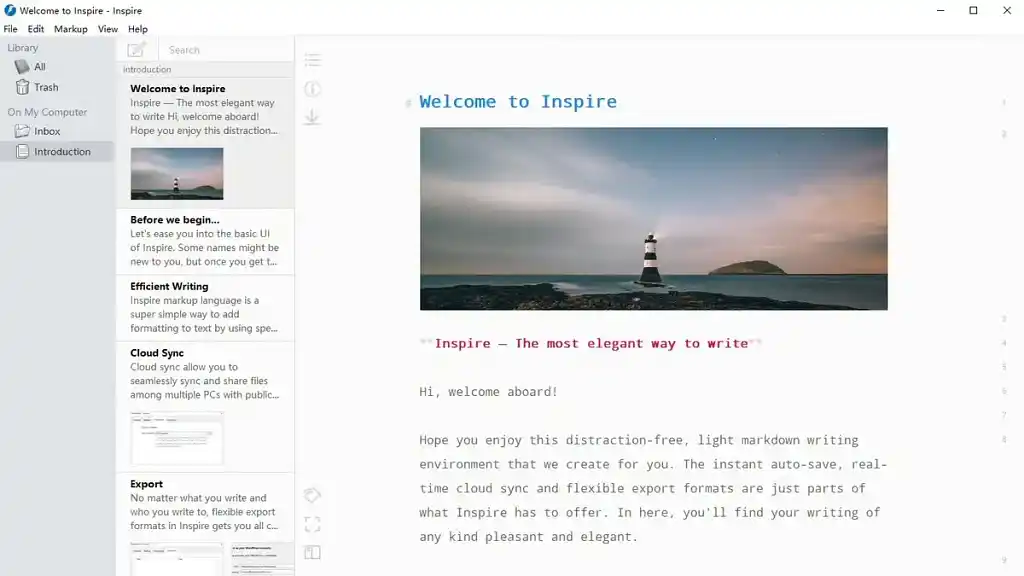
Inspire Writer is for anyone who opens a blank document and immediately gets distracted by cluttered interfaces and constant notifications. This Markdown editor creates a minimalist writing environment where advanced features stay hidden until you actually need them, giving you a clean workspace without sacrificing functionality.
The workflow is super simple: open your project in the unified library (which organizes everything you write in one place), choose your focus mode, and write. Inspire Writer automatically saves your work as you type and can sync across multiple Windows PCs using Google Drive, Dropbox, or OneDrive. When you're ready to share, export to PDF, DOCX, HTML, Markdown, or publish directly to WordPress, Medium, or Ghost — all from within the app.
Reviewers online consistently praise Inspire's simplicity, reliability, and ability to help writers stay focused. Its typewriter mode, dark mode, and full-screen options create an immersive writing experience, while features like tagging, password protection, and hierarchical file organization stay tucked away until needed.
That focus-first philosophy is what sets Inspire Writer apart: instead of overwhelming you with features, it keeps the interface clean while offering robust tools (tables, footnotes, syntax highlighting) when you need them. It focuses on being an excellent Windows-native app — which means it's deeply optimized for Windows users, but unavailable on Mac, mobile, or web. So, if you work exclusively on Windows and want a distraction-free Markdown editor that feels native to your system, Inspire Writer delivers exactly that. If your workflow spans multiple platforms, though, you may want something else.
|
Pros |
Cons |
|
➕ Very clean, minimal writing interface |
❌ Windows-only — no Mac, Linux, or mobile versions available |
|
➕ Excellent distraction-free focus modes |
❌ Uses Markdown formatting, which has a learning curve for some writers |
|
➕ Export to multiple formats or publish directly to WordPress/Medium/Ghost |
❌ Not a full publishing suite (must be paired with another tool like Reedsy Studio) |
At the end of the day, there’s no single “best” writing tool for everyone (Sorry, we know that's not the definitive answer you were hoping for!). The right choice depends on where you are in your project and how your brain works. Some writers need visual planning apps like Plottr, others need a focus app like Inspire Writer, and plenty just want a single, capable tool that does it all, like Reedsy Studio.
The good news? Most of the tools on this list offer free plans or trials. Test them out and see what actually supports your writing habits instead of fighting against them. At the end of the day, the perfect tool isn't the fanciest or most expensive app out there: it's the one that keeps you writing.
About the author

Nick Bailey writes about anything and everything in the realm of writing and publishing. From articles on honing your craft to launching your book, Nick aims to provide valuable insights and practical tips to the Litreactor community in his posts. Aside from books, Nick enjoys hiking, electronic music, and filling up his personal cookbook with new recipes.